The one enclosure here that takes M.2 SATA drives and no NVMe
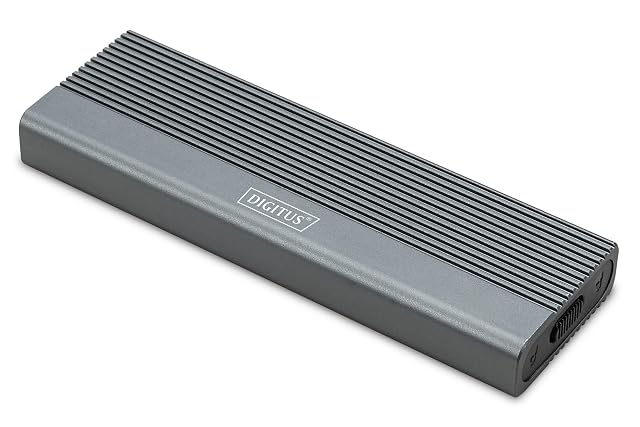
DIGITUS M.2 SATA B-key enclosure, 2230 to 2280, USB 3.1 Gen2 Type-C, 101 × 32 × 10 mm
The cheapest enclosure on this shelf and the only one that will not read an NVMe drive at all: a B-key M.2 SATA housing whose chipset is named and whose dimensions are printed to the millimetre.
Specifications
- Supported drive protocols
- M.2 SATA in the B-key format only — stated in the title and in the second bullet. No NVMe drive will work in it, and the key notch of an M.2 SATA drive and an NVMe drive look much the same, which is why the title says B-Key and why this line says it first
- Supported drive lengths
- 2230, 2242, 2260 and 2280 — all four listed in the second bullet, with a capacity of up to 8 TB given in the third
- Interface standard
- USB 3.1 Gen2 — stated in the title and in the first bullet, which adds backward compatibility with USB 3.0, 2.0 and 1.1
- Stated link rate
- 6 Gbps — the first bullet says the USB 3.1 Gen2 interface supports transfer rates of up to 6 Gbps. Six gigabits per second is the rate of the SATA III standard rather than of a USB 3.1 Gen2 port, and the listing prints the two figures against each other without reconciling them
- Connector type
- Type-C — stated in the title. The socket on the enclosure is what is described; the cable in the box is not published on the listing
- Case material
- Not published on the listing — no metal and no plastic is named. The fourth bullet gives the dimensions as 101 × 32 × 10 mm and calls the enclosure a suitable companion for travel, the office or university
- Thermal arrangement
- Not published on the listing — no thermal pad, no heatsink and no fin pattern is named. The third bullet credits the JMS576B chipset with reliable and efficient performance and says nothing about heat
- Tool-free assembly
- Tool-free — the second bullet says the M.2 module is inserted without tools, which it gives as the reason the installation is easier
- Cables supplied
- Not published on the listing — no lead is named in any bullet. The fourth says the power comes over USB with no separate mains adapter, which describes the supply rather than the cable
- Amazon reference
- B0DC6S54ZR (same reference on 6 Amazon marketplaces)
- EAN
- 4016032497554
On the listing
An M.2 SSD enclosure with a USB 3.1 Gen2 Type-C interface, stated to support transfer rates of up to 6 Gbps and backward compatible with USB 3.0, 2.0 and 1.1; compatibility with SATA SSDs in the B-key format in sizes 2230, 2242, 2260 and 2280, with tool-free insertion of the module; support for solid-state drives up to 8 TB and a JMS576B chipset credited with reliable and efficient performance; dimensions of 101 × 32 × 10 mm with power taken over USB and no separate mains adapter; and plug-and-play compatibility with Windows, macOS, Linux, ChromeOS, Android and iOS from the iPhone 15 onwards.
B-key, SATA, and not NVMe
This is the only enclosure on this shelf that will not read an NVMe drive, and it is the first thing anybody needs to know about it.
M.2 is a shape. Two entirely different kinds of drive are made in that shape — SATA ones speaking the protocol a hard disk speaks, and NVMe ones speaking over PCIe — and from across a desk they are indistinguishable. The difference is a notch and a protocol.
The title says B-Key. The second bullet says SATA SSDs. Neither says NVMe, and an NVMe drive fitted here will not be seen.
That makes it the answer to a real problem rather than a lesser product. M.2 SATA drives came out of a great many laptops, and the other five enclosures in this hub will not read a single one of them.
Six gigabits, against a ten-gigabit interface
The first bullet says the USB 3.1 Gen2 interface supports transfer rates of up to 6 Gbps.
Those are two different links written as one. Six gigabits per second is the SATA III figure — the rate the drive itself speaks. USB 3.1 Gen2 is the class of the socket on the outside.
This page reports both because both are printed and does not correct either. What a buyer can take from it is the rule this whole hub is built on: the chain runs drive, bridge, cable, host port, and the slowest of them sets the result. A SATA drive is bounded by SATA no matter how quick the port is, and an old USB 3.0 socket bounds it further still.
The chipset, named
The third bullet names the JMS576B.
That is worth more than it looks. The bridge chip is the part that decides whether an enclosure works reliably with a given drive and a given operating system, and it is the component people search for when something misbehaves. Two of the six listings on this shelf never name theirs.
A hundred and one by thirty-two by ten
The fourth bullet publishes the dimensions and the fifth publishes the operating systems, which together describe the thing as an object rather than as a promise.
What is missing from that description is what it is made of. No aluminium, no plastic, nothing. And there is no thermal pad, no heatsink and no fin pattern anywhere on the page — which matters less for a SATA drive than it would for a fast NVMe one, and is still the line four of the six enclosures here fill in.
Before ordering
Read what is printed on the drive: if it says NVMe or PCIe, this is not the enclosure. Expect SATA rates rather than the class figure of the port. And note that no cable is named — the power comes over USB, and what lead arrives with it is not on the page.
Availability
Priced at roughly 8 € on the German Amazon store the day this page was checked.
It is stocked on the American and British Amazon stores as well, in that country’s own currency. The range above leaves those out: it counts euro stores and no others.
The French, Italian and Spanish Amazon price runs past 1.6× the cheapest store. A gap that size normally marks a reshipper and not a seller in the country, so those listings stay out of the range above.
Every figure in this section is what Keepa held on the day this page was last updated. Stock and prices move without warning.
Prices quoted in this text were read on 10 September 2026. The live price is at the top of the page.