Describes what the lights do when a copy fails
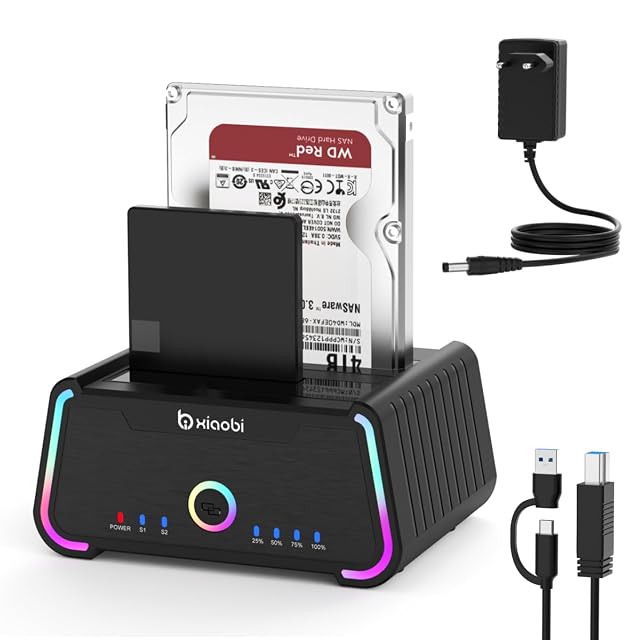
xiaobi dual-bay SATA dock, USB-C and USB-B, USB 3.0 at 5 Gbps, offline copy, RGB switch
The dock that describes its own failure state — four blue lights blinking means the copy did not work — and the only one here with a switch to turn its lighting off.
Specifications
- Bay count
- Two — stated in the title and in the first bullet, which describes two SATA drive interfaces alongside a Type-C socket, a USB-B socket and separate power and RGB buttons
- Supported drive sizes
- 2.5-inch and 3.5-inch — stated in the title and in the third bullet
- Supported drive interfaces
- SATA hard discs and solid-state drives — stated in the third bullet. No SATA revision is named
- Solid-state slot support
- Not published on the listing — no M.2 position is named. Solid-state drives are supported in the two SATA bays and no separate slot exists
- Offline cloning
- Stated — the second bullet describes copying from one SATA drive to another with a switch and no software or tools, and adds three marked notes: use a larger destination, disconnect the PC during the copy, make sure the destination capacity is at least as large as the source, and read four blinking blue LEDs as a failed copy
- Interface standard
- USB 3.0 — stated in the fourth bullet as supporting extremely fast USB 3.0 data transfer
- Stated link rate
- Up to 5 Gbit/s — stated in the fourth bullet
- Connector type
- A Type-C socket and a USB-B socket on the dock, with a USB-B to USB-C cable and a USB-A adapter supplied — stated in the first and sixth bullets. It is the only dock on this shelf to publish both its sockets and its cable
- UASP support
- Not published on the listing — UASP is not named anywhere in the six bullets. Fourteen of the nineteen listings in this lot publish it, so the silence is worth noticing
- Power supply
- Not published on the listing — no adapter, no voltage and no current is named, on a dock stated to take two 3.5-inch drives
- Per-bay controls
- Separate power and RGB buttons are stated in the first bullet, with the RGB switch on the rear named again in the fifth. Neither is per-bay: no individual bay switch and no per-bay indicator is published
- Amazon reference
- B0GGR3P52T (same reference on 6 Amazon marketplaces)
- EAN
- 0635393178823
On the listing
A dual-bay SATA drive docking station for 2.5-inch and 3.5-inch HDDs and SSDs, with two SATA interfaces, a Type-C socket, a USB-B socket and separate power and RGB buttons, with a note that macOS is supported and that compatibility with particular file systems may vary; an offline copy function needing no software or tools, with marked notes to use a larger destination, to disconnect the PC during the copy, to ensure the destination is at least as large as the source, and to read four blinking blue LEDs as a failed copy; support for up to 32 TB as 16 TB × 2 with a single drive supporting up to 20 TB, plug and play with no tools or drivers and a note that new drives must be initialised first; USB 3.0 transfer at up to 5 Gbit/s; intelligent RGB lighting showing the status by a breathing pattern, switchable off with the RGB button on the rear; and a package containing a USB-B to USB-C cable and a USB-A adapter.
The failure signal
Four blinking blue LEDs means the copy did not work. One listing in nineteen tells you that.
Every dock on this shelf has lights. Almost none of them describes what the lights say, and the pattern nobody ever documents is the one that matters — the one that means stop, this did not happen.
Without it, a failed clone is found out later: the destination drive goes into a machine, is unreadable, and the source is now the only copy of something that was supposed to have two.
The second bullet also carries the two instructions that go with it: use a larger destination, and disconnect the computer while the copy runs. Both are the sort of thing that ends up in a manual nobody opens.
Sockets and cable, both published
The first and sixth bullets between them do something no other dock in this hub manages: they say what is on the dock and what is in the box.
On the dock: a Type-C socket and a USB-B socket. In the box: a USB-B to USB-C cable and a USB-A adapter.
That covers a modern laptop and an older desktop from one package, and it means nobody has to guess which end of what is needed. Five of the seven docks here never name a connector at all.
The third bullet gives 32 TB as 16 TB × 2, and then says a single drive supports up to 20 TB.
Both are printed. Read together they suggest a per-bay ceiling that depends on how many bays are occupied, which is a reasonable interpretation and not one the page makes. This site reports the two figures rather than reconciling them.
For most buyers it is academic. For anyone with a 20 TB drive and a second drive to go beside it, it is the question to ask before ordering.
The lighting, and the switch
The fifth bullet describes RGB lighting with a breathing pattern indicating status, and says it can be turned off with a switch on the back.
The switch is the part worth praising. Illuminated computer equipment is a matter of taste, and a dock is often the thing sitting in a bedroom or a study where a slow pulsing glow at two in the morning is not what anybody wanted. Making it optional costs nothing and settles the argument.
No UASP, and no supply rating
No UASP anywhere. No power supply, no voltage, no current, on a dock that takes two 3.5-inch mechanisms and therefore cannot run without a mains adapter.
Both silences are the same shape as on the two docks either side of this one in price, and the second is the one with practical consequences.
Before ordering
Ask what adapter is in the box and how it is rated. Confirm the capacity question if a 20 TB drive is involved. And note the instruction the second bullet gives: disconnect the computer before starting a copy, and watch for four blue lights.
Availability
Priced at roughly 25 € on the German Amazon store the day this page was checked.
It is stocked on the American and British Amazon stores as well, in that country’s own currency. The range above leaves those out: it counts euro stores and no others.
The French and Italian Amazon price runs past 1.6× the cheapest store. A gap that size normally marks a reshipper and not a seller in the country, so those listings stay out of the range above.
In the Spanish Amazon catalogue with no live offer against it: the reference exists, nobody is filling it.
Every figure in this section is what Keepa held on the day this page was last updated. Stock and prices move without warning.
Prices quoted in this text were read on 10 September 2026. The live price is at the top of the page.