Publishes how long the clone button must be held
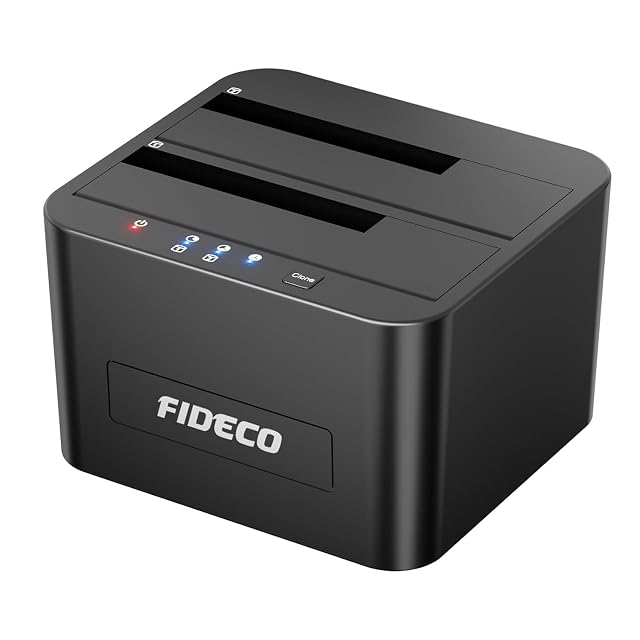
FIDECO dual-bay SATA dock, USB 3.0 at 5 Gbps, offline clone on a five-second press, 2 × 12 TB
The cheapest dock in this hub, and the one that tells you exactly how the copy is started: hold Clone for five seconds until the light blinks, with no computer attached.
Specifications
- Bay count
- Two — stated in the third and fourth bullets, which describe two drives put into their respective slots and two drives supported at the same time
- Supported drive sizes
- 2.5-inch and 3.5-inch — stated in the title and in the fourth and fifth bullets, which describe the flexibility of connecting two drives of either size to a computer
- Supported drive interfaces
- SATA I, II and III, hard discs and solid-state drives — stated in the fourth bullet, with the first adding that only SATA drives and SSDs are supported
- Solid-state slot support
- Not published on the listing — no M.2 position of any kind is named. Solid-state drives are supported in the two SATA bays and no separate slot exists
- Offline cloning
- Stated — the third bullet says two drives are put in their slots and the Clone button held for five seconds until the LED blinks, and that the copy is completed without a computer. It is the only listing on this shelf to publish both the duration of the press and the signal that confirms it
- Interface standard
- USB 3.0 — stated in the title and in the second bullet
- Stated link rate
- Up to 5 Gbps — stated in the second bullet as a very fast data transfer speed over USB 3.0
- Connector type
- Not published on the listing — no socket and no cable is named in any bullet
- UASP support
- Not published on the listing — UASP is not named anywhere. Fourteen of the nineteen listings in this lot publish it, so the silence here is worth noticing rather than assuming
- Power supply
- Not published on the listing — no adapter, no voltage and no current is named, on a dock that accepts two 3.5-inch drives at once and cannot run from a USB port
- Per-bay controls
- Not published on the listing — no power switch and no per-bay light is named. The third bullet describes a single LED that blinks when the clone starts
- Amazon reference
- B08291CB6J (same reference on 6 Amazon marketplaces)
- EAN
- 0751450850409
On the listing
A SATA drive docking station universally compatible with Windows from XP, macOS and Linux, supporting only SATA drives and SSDs; USB 3.0 with speeds of up to 5 Gbps; offline cloning, where two drives are put into their respective slots and the Clone button is held for five seconds until the LED blinks, with the copy completed without a computer; support for two 12 TB drives at once for 2.5-inch and 3.5-inch SATA I, II and III HDDs and SSDs, with no drivers required and a tool-free installation; and a stated purpose of adding a drive to a computer easily, with the flexibility of connecting two 2.5-inch or 3.5-inch drives.
Five seconds, and a blinking light
Five docks on this shelf publish offline cloning. One of them tells you how to start it.
The third bullet: put two drives in, hold Clone for five seconds, wait for the LED to blink.
That reads like packaging copy and it is the most practically useful sentence on the page. A clone button that does nothing on a short press is the commonest confusion with these devices, and knowing there is a five-second hold and a blink to confirm it turns a worrying first attempt into an ordinary one.
The other four cloning docks here describe the function. This one describes the operation.
What a clone is not
The listing calls it cloning, which is the right word, and it is worth being clear about what that leaves out.
A clone is a duplicate of a drive at one moment. It does not keep yesterday’s version of a file that was overwritten this morning. It does not survive a fire, a theft or a flood, because it sits on the same desk. It does not notice that the source drive was already corrupted when it was copied.
Those are the things a backup arrangement does, and a dock does none of them. What it does well is move a system to a larger drive, produce an identical spare, or read a drawer of old discs — and the maker’s own instructions govern how the copy is set up, including which slot is the source.
Twenty-four terabytes, in two halves
The fourth bullet gives two 12 TB drives at once.
That is the lower of the capacity claims on this shelf, where two docks state 2 × 16 TB and two state 2 × 20 TB. For most of what a dock is used for — reading drives that already exist — it is academic, and it becomes the deciding figure only when the destination of a clone has to be as large as the source.
The two lines that are not here
No power supply. No UASP.
The first is the more serious. Two 3.5-inch mechanisms spinning up at once draw far more than a USB port can supply, so a dock like this cannot work without a mains adapter — and no bullet on this page mentions one, its voltage or its current. Two docks in this hub publish both figures. This one publishes nothing.
The second is a silence worth noticing. Fourteen of the nineteen listings in this lot name UASP, which suggests makers regard it as worth advertising. Where a page does not mention it, that is information rather than an omission to be filled in from hope.
Before ordering
Ask what adapter is in the box and what it is rated at, because two 3.5-inch drives will not run without one. Ask what cable and what socket, since neither is named. And treat the clone function as a duplication tool rather than as an arrangement for keeping anything safe.
Availability
Priced from 24 € to 28 € across the German, French and Spanish Amazon stores the day this page was checked.
It is stocked on the American and British Amazon stores as well, in that country’s own currency. The range above leaves those out: it counts euro stores and no others.
The Italian Amazon price runs past 1.6× the cheapest store. A gap that size normally marks a reshipper and not a seller in the country, so that listing stays out of the range above.
Every figure in this section is what Keepa held on the day this page was last updated. Stock and prices move without warning.
Prices quoted in this text were read on 10 September 2026. The live price is at the top of the page.