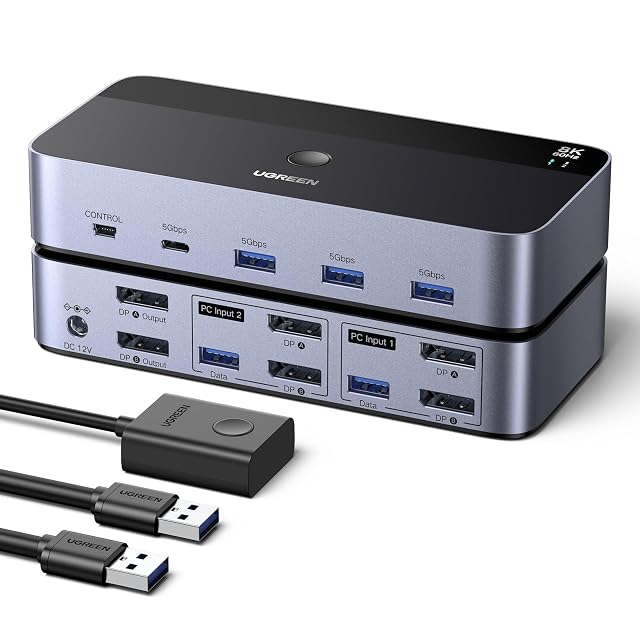
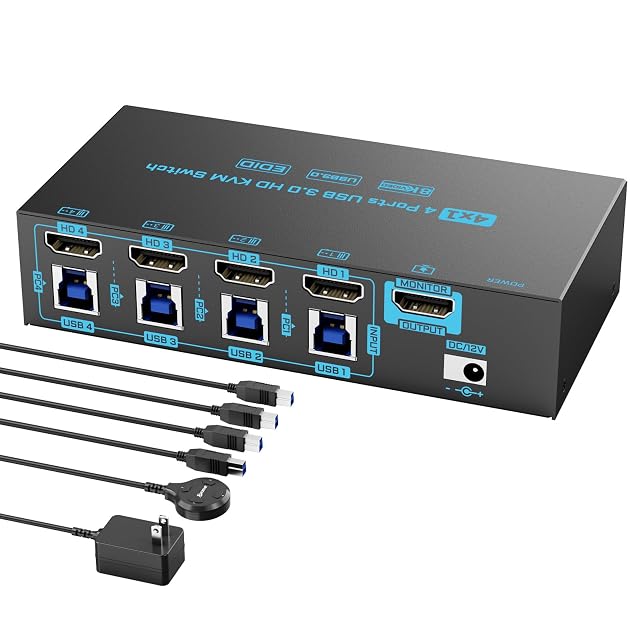
These two answer opposite versions of the same desk problem, and both stop at 8K and 60 Hz. The UGREEN AK700 takes two computers and drives two DisplayPort screens from each, and states in as many words that it has no HDMI socket. The DXchip ZX-KVM8401B002 takes four computers onto one HDMI screen, adds 4K at 144 Hz, and carries an EDID emulator you can switch off by holding a button.
UGREEN AK700, two-computer DisplayPort switch driving two screens
AK700, two-computer DisplayPort switch driving two screens
ZX-KVM8401B002, four-computer HDMI switch with an EDID emulator
Port count
Two desktop computers
Four computers sharing one screen and one keyboard and mouse set
Maximum resolution
Up to 8K at 60 Hz, backwards compatible to 8K at 30 Hz, 4K, 1080p, 720p and 480p — the ceiling of the switch alone
Up to 8K at 60 Hz and 4K at 144 Hz, with the page stating that the final figure depends on the graphics cards, the screens and the leads
Refresh rate
60 Hz at 8K, with 8K at 30 Hz also named, given as pairs
60 Hz at 8K and 144 Hz at 4K, given as pairs
Video connector type
DisplayPort 1.4, with the page stating that this switch has no HDMI socket
HDMI 2.1, four in and one out
Screens per computer
Two DisplayPort screens shared by the two machines, copying or extending
One
USB port count
Four — three USB-A and one USB-C
Four USB 3.0, for a keyboard, mouse, printer, scanner or camera
USB generation
USB 3.0 at up to 5 Gbps, backwards compatible with 2.0 and 1.1, with peripherals following the machine when it is changed
USB 3.0 at up to 5 Gbps, described as a four-in four-out USB switch as well as a video switch
Switching method
Two — a button on the unit and a desk controller
Two — a panel button and a wired desk controller of 1.5 m, with indicator lights; holding the first button for three seconds turns the EDID emulation on or off
Audio support
Not published — HDR10, HDR10+ and HDCP 2.3 are named for the video path and no audio socket appears
Not published — no audio socket, channel arrangement or format among the seven bullets
Cables supplied
Two USB-A leads, one desk control and a 12 V 2 A adapter with interchangeable plugs; no DisplayPort lead named
Four USB 3.0 leads, a 12 V adapter and a wired remote of 1.5 m, with a twelve-month warranty; no video lead named
A tick means one listing published something the other did not, or published
a better figure. It does not mean the product is better, and the column is not
a score out of anything: a maker who says less loses lines here without losing
a comparison. The two verdicts below are where the page is settled.
Which one, for whom
Buy the UGREEN AK700, two-computer DisplayPort switch driving two screens
The AK700 is the one for a two-machine desk with two screens — a work laptop and a personal tower sharing the same pair of monitors, in either a copying or an extending arrangement. It is DisplayPort only, and its listing says so outright, which saves a return. One USB-C among its four sockets is unusual on this shelf. It supplies no video lead, so budget for two DisplayPort cables per machine.
Buy the DXchip ZX-KVM8401B002, four-computer HDMI switch with an EDID emulator
The ZX-KVM8401B002 takes twice the machines onto a single screen and adds 4K at 144 Hz for anything driven fast. The EDID emulator is the feature worth understanding: it keeps each computer believing a screen is attached, so windows do not rearrange themselves when you switch away — and holding a button for three seconds turns it off if it causes trouble. It ships four USB leads and no video lead.
The questions that come up before an order
Will either switch actually give me 8K at 60 Hz?
Only if everything else in the chain does. Both figures are the ceiling of the switch alone, and the DXchip page says so plainly — the graphics cards, the screens and the leads each impose their own limit, and the lowest of them wins. Neither page claims a measurement, and neither should be read as one.
What does the EDID emulator do?
It holds the screen’s identity on each input, so a computer you have switched away from still believes a display is connected. Without it, some systems treat the switch as an unplugged monitor and shuffle windows about when you come back. On the DXchip it can be turned off by holding the first button for three seconds; the UGREEN page does not mention the feature.
two computers · two DisplayPort screens each · 8K at 60 Hz · DisplayPort 1.4, no HDMI socket · four USB 3.0 at 5 Gbps · button or desk controller
A two-computer switch that carries two DisplayPort screens for each machine, states plainly that it has no HDMI socket, and names the machines it will not drive in pairs.
Best for: A two-machine desk with two DisplayPort screens, where the peripherals should follow whichever machine is in use and the picture never passes through an HDMI socket.
four computers · one screen · 8K at 60 Hz and 4K at 144 Hz · HDMI 2.1 · four USB 3.0 at 5 Gbps · panel button or wired controller · four USB leads and an adapter supplied
A four-computer HDMI switch that publishes two resolution and rate pairs, supplies its USB leads and a power adapter, and says outright that the final figure depends on the machines.
Best for: A desk of four machines on one screen where fast peripherals move between them, and where the window arrangement has to survive every change of machine.