Skip to content

ROFAVEZCO EZ-SW41H21-KVMU3P, four-computer HDMI switch with hotkey and infrared control vs MLEEDA four-computer HDMI switch driving two screens, with RS232 control

A higher video ceiling, or a second screen and a serial port?

Both take four machines and neither ships a video lead. The ROFAVEZCO EZ-SW41H21-KVMU3P drives one screen at up to 8K and 60 Hz, adds 4K at 120 Hz, and names five audio formats carried over the video path — with control by keyboard hotkey, infrared remote or button. The MLEEDA switch drives two screens at 4K and 60 Hz, counts its USB sockets, and adds RS232 at 115200 baud for control from a system that expects one.

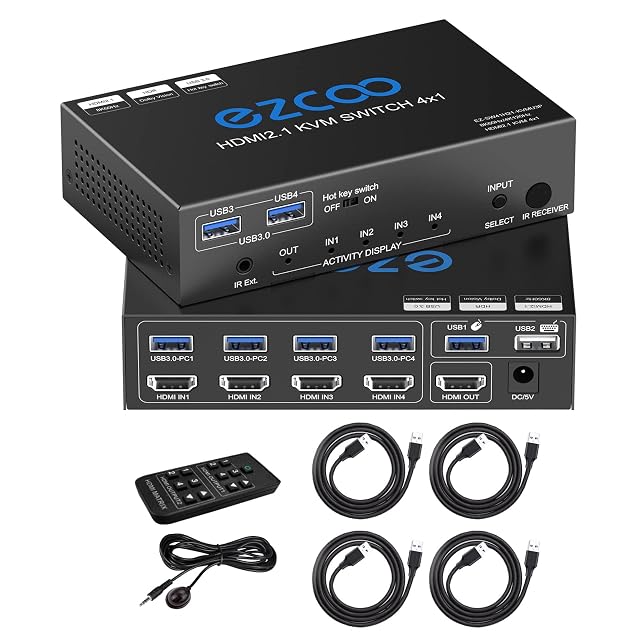
ROFAVEZCO EZ-SW41H21-KVMU3P four-port HDMI KVM switch with an infrared remote and four USB 3.0 leads

ROFAVEZCO EZ-SW41H21-KVMU3P, four-computer HDMI switch with hotkey and infrared control

Wins 4 of 10

Check price

≈ 110 €

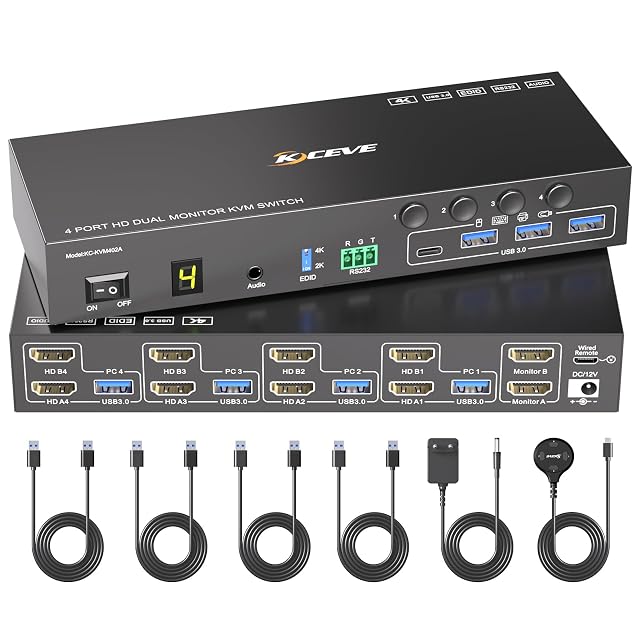
MLEEDA four-port HDMI KVM switch for two monitors with four USB 3.0 sockets and a wired remote

MLEEDA four-computer HDMI switch driving two screens, with RS232 control

Wins 5 of 10

Check price

≈ 106 €

Line by line

Compared on EZ-SW41H21-KVMU3P, four-computer HDMI switch with hotkey and infrared control four-computer HDMI switch driving two screens, with RS232 control
Port count Four computers from one keyboard, mouse and screen Up to four computers
Maximum resolution Up to 8K at 60 Hz and 4K at 120 Hz — the ceiling of the switch alone Up to 4K at 60 Hz, backwards compatible to 4K at 30 Hz, 2560 by 1440 at 120 Hz and below — the ceiling of the switch alone
Refresh rate 60 Hz at 8K and 120 Hz at 4K, given as pairs 60 Hz at 4K, with 120 Hz named at 2560 by 1440, given as pairs
Video connector type HDMI 2.1, four in and one out HDMI, with two screens at the output
Screens per computer One Two, extending or mirroring
USB port count Not published as a count — USB 3.0 is named four times and four leads are supplied, and no bullet says how many sockets the unit carries Four USB 3.0 sockets
USB generation USB 3.0, with type A to type A leads; no transfer rate quoted for the USB path USB 3.0 at 5 Gbit/s, backwards compatible with 2.0 and 1.1
Switching method Three — a keyboard hotkey, an infrared remote and a button on the unit Three — panel buttons numbered 1 to 4, a wired remote of 1.5 m, and RS232 at 115200 baud, with an indicator light
Audio support Carried over the video path — Dolby Atmos, DTS X, Dolby TrueHD, DTS-HD Master Audio and PCM 7.1 named; no separate audio socket Named in the title among the shared connections and described nowhere else — no socket type, no channel count, nothing on whether audio follows the video
Cables supplied Four USB 3.0 leads, type A to type A, and a power supply; no video lead named Four USB 3.0 leads of 1.5 m, a wired remote of 1.5 m, a power supply and a manual, with a one-year warranty; no video lead named

A tick means one listing published something the other did not, or published a better figure. It does not mean the product is better, and the column is not a score out of anything: a maker who says less loses lines here without losing a comparison. The two verdicts below are where the page is settled.

Which one, for whom

Buy the ROFAVEZCO EZ-SW41H21-KVMU3P, four-computer HDMI switch with hotkey and infrared control

The EZ-SW41H21 is the one with headroom: 8K at 60 Hz, 4K at 120 Hz, HDMI 2.1, and five surround formats named as carried through. Control by keyboard hotkey means never reaching for the unit at all, and an infrared remote is a second way in. Its page never counts its own USB sockets — it names USB 3.0 four times and supplies four leads, and leaves you to infer the rest — and it drives a single screen.

Buy the MLEEDA four-computer HDMI switch driving two screens, with RS232 control

The MLEEDA is the two-screen switch, which for a four-machine desk is usually the point. It counts its sockets, quotes 5 Gbit/s on them, and offers RS232 at 115200 baud, which matters only if something is going to drive it automatically — and matters a great deal then. Its video ceiling is 4K at 60 Hz, well below its rival, and its audio is named in the title and explained nowhere.

The questions that come up before an order

Does the audio follow when I switch machines?

On the ROFAVEZCO, audio travels with the video: the page names five formats carried over HDMI and no separate socket, so it moves when the picture does. On the MLEEDA, audio appears in the title among the shared connections and in no bullet, so the page never says which socket carries it or what happens on a switch. That is a real gap on a switch sold for a shared desk.

When is RS232 worth having?

When something other than a person does the switching — a control system, a rack automation panel, a script on a serial line. At 115200 baud it is a control channel, not a data one. For a desk switched by hand, the buttons and the wired remote are what you will use, and the serial port will sit unused.

The full reviews

Every price named in a summary was read on the date that review carries. What a shop asks today is shown beside the product, and it moves.