Skip to content

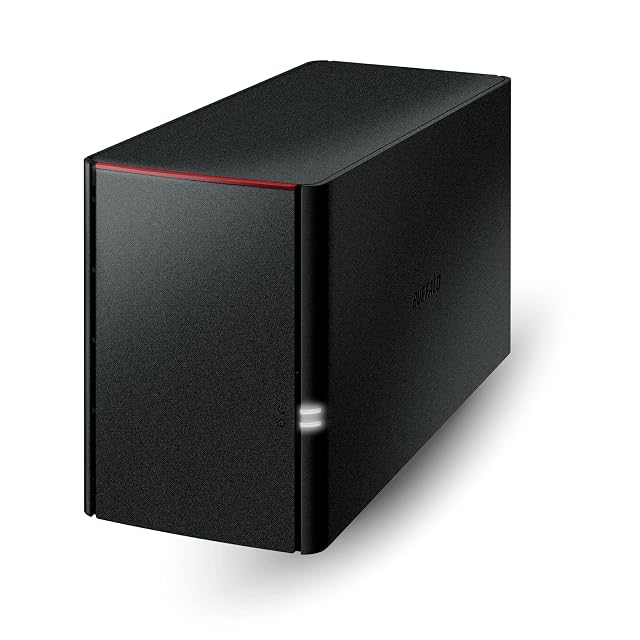
BUFFALO LinkStation 210, 4 TB review

A one-bay unit supplied with its 4 TB drive, whose first bullet offers RAID on a machine with a single bay and whose own first line recommends a different range for current macOS.

This is one of eight listings on this shelf that arrive with the drives already in, which changes what the price compares against: $192.99 here buys the enclosure and 4 TB of storage, where the twelve enclosures sold empty here are a box and a shopping list.

The first bullet calls it a “Value NAS with RAID”. It has one bay. A single drive cannot form an array of any kind — there is nothing for it to be redundant against — and the seventh bullet states the position plainly: 4 TB capacity, one drive bay, drive included. The RAID claim is range copy, carried onto a machine that cannot honour it, and the same first bullet appears word for word on the two-bay LinkStation 220 further down this shelf, where it is true. Read the seventh bullet and ignore the first.

The first bullet also does something unusual, and five other listings on this shelf repeat it: it recommends a different product. “Check out the LS 700 for enhanced features, cloud capabilities, macOS 26, and up to 7x faster performance than the LS 200.” The second bullet carries the matching footnote — compatibility is for macOS 15 (Sequoia) and earlier, and for macOS 26 the buyer should look at the LS 700 series. macOS 26 is the current release. A Mac buyer reading this page is being told, by the page, to buy something else.

What the page does publish is a policy rather than a specification. The fourth bullet describes a closed system, chosen to reduce the exposure that third-party applications bring, with SSL encryption for transfers. That is the opposite of the UGREEN DXP4800 GT on this shelf, which names UGOS Pro and opens it to Docker, virtual machines and self-hosted applications. Neither approach is better in the abstract; they answer different questions, and both pages say which they are answering.

The hardware line is almost empty. No processor, no memory figure, no socket count, no port speed, no drive size, no decibel value and no figure in watts. The second bullet says to connect the unit to a router and nothing about how fast that connection is. For a unit whose whole argument is that it works without configuration, that is consistent; it also means there is no figure on the page to set against the 1GbE and 2.5GbE sockets published elsewhere here.

The management software is named — NAS Navigator, with NAS Navigator 2 for macOS 15 and earlier — along with PC backup software included and per-folder access restrictions. The ninth bullet states “Made in Japan” — the eight LinkStation listings here all do, and nothing else on this shelf names a country of manufacture at all. The tenth gives 24-hour support based in the United States and a two-year warranty that includes the hard drives: the commonest term on this shelf, and one of eight here that covers a drive, because it is one of eight that supplies one. The LinkStation SoHo 220 gives three years.

The product record carries 1,102 g (38.9 oz) and 240 by 84 by 220 mm (8.66 in). The 6 TB version of this same model carries the same weight and a different set of measurements, which is the record contradicting itself between two capacities of one chassis.

Prices quoted in this text were read on October 26, 2026. The live price is at the top of the page.
Where it holds up, and where it stops

Strengths

  • Arrives with its 4 TB drive fitted, so the price covers the storage as well as the box, where twelve enclosures on this shelf are sold empty
  • The warranty runs two years and covers the hard drive, which only a listing that supplies one can offer
  • States its security approach as a policy — a closed system, no third-party applications, SSL on transfers — rather than listing features
  • Names the management and backup software supplied, where several of the empty enclosures here never name their software at all
  • Twenty-four-hour support based in the United States, and a country of manufacture stated, which nothing outside the LinkStation range here does

Compromises

  • The first bullet offers RAID on a machine with one bay, which no single drive can provide
  • macOS compatibility stops at macOS 15, and the page itself directs macOS 26 buyers to a different range
  • No processor, no memory, no socket count and no port speed: nothing on the page describes the hardware
  • The first bullet recommends the LS 700 as up to seven times faster, which is the listing arguing against itself
  • One bay means the capacity is fixed at 4 TB with no way to add to it

Specifications

Bay countOne — stated in the title as 1-Bay and in the seventh bullet as one drive bay with the drive included. The first bullet calls the unit a NAS with RAID, which a single bay cannot provide
Drive interfaceNot published on the listing as a size or a bus — the seventh bullet states 4 TB of capacity with the drive included, and no inch figure and no bus appears anywhere on the page
Solid-state slot countNot published on the listing — no M.2 slot and no cache slot is named in the title or in any of the ten bullets
ProcessorNot published on the listing — no chip, no core count and no clock speed appears anywhere on the page
MemoryNot published on the listing — no memory figure of any kind appears in the title or the ten bullets
Ethernet port countNot published on the listing as a figure — the second bullet says to connect the unit to a router and counts no socket
Port speedNot published on the listing — with no socket counted, none is given a rate, and no figure in gigabits or megabytes per second appears on the page
USB portsNot published on the listing — no USB socket is named or counted anywhere
Supported redundancy levelsNone possible, and RAID nonetheless claimed — the first bullet offers a NAS with RAID while the seventh states one drive bay. A single drive has nothing to be redundant against. Carrying on through a drive failure is in any case a different thing from holding the data in a second place
Published operating systemNot named, and described as closed — the fourth bullet states a closed system chosen to reduce exposure from third-party applications, with SSL encryption for transfers. The fifth names the NAS Navigator management utility, with NAS Navigator 2 for macOS 15 and earlier
Stated idle powerNot published on the listing — no figure in watts appears on the page
Stated acoustic figureNot published on the listing — no decibel value and no claim about noise appears
Stated dimensionsNot published in the bullets — the product record carries 240 by 84 by 220 mm (8.66 in) and 1,102 g (38.9 oz). The 6 TB version of the same model carries the same weight and different measurements in that record
Amazon referenceB00JKM0ES2
EAN0747464127873
On Amazon.comAmazon.com had an offer at $193 on October 26, 2026.

Where this unit differs

Put against the median of its own group on this site — not against every network product sold.

  • Bay countOne — stated in the title as 1-Bay and in the seventh bullet as one drive bay with the drive included. The first bullet calls the unit a NAS with RAID, which a single bay cannot provide-50 % against the median of this group
  • Drive interfaceNot published on the listing as a size or a bus — the seventh bullet states 4 TB of capacity with the drive included, and no inch figure and no bus appears anywhere on the page-50 % against the median of this group
  • Stated dimensionsNot published in the bullets — the product record carries 240 by 84 by 220 mm (8.66 in) and 1,102 g (38.9 oz). The 6 TB version of the same model carries the same weight and different measurements in that record+17 % against the median of this group

The questions that come up before an order

Can a one-bay unit do RAID?

No. The first bullet calls it a NAS with RAID and the seventh states one drive bay with the drive included. An array needs at least two drives; with one there is nothing to be redundant against.

Does it work with current macOS?

The second bullet states compatibility with macOS 15 (Sequoia) and earlier, and directs macOS 26 buyers to the LS 700 series instead. macOS 26 is the current release.

Is the drive included in the price?

Yes. The seventh bullet states 4 TB of capacity with the hard drive included, and the tenth states that the two-year warranty covers the drives as well as the unit.

Against the rest of the network and storage gear

This network and storage gear share the category and the price bracket. Only what each one states is shown; an incomplete column would mislead.

Model Price Bay countDrive interfaceSolid-state slot countProcessor
BUFFALO LinkStation 210, 4 TB $193 One — stated in the title as 1-Bay and in the seventh bullet as one drive bay with the drive included. The first bullet calls the unit a NAS with RAID, which a single bay cannot provideNot published on the listing as a size or a bus — the seventh bullet states 4 TB of capacity with the drive included, and no inch figure and no bus appears anywhere on the pageNot published on the listing — no M.2 slot and no cache slot is named in the title or in any of the ten bulletsNot published on the listing — no chip, no core count and no clock speed appears anywhere on the page
Synology DiskStation DS124 $160 One — stated in the title as a 1-Bay diskless unit. Twelve of the twenty-one listings on this shelf are sold without a drive, and this is one of themNot published on the listing — the title states the unit is diskless and no drive size in inches and no bus appears in the title, the five bullets or the descriptionNot published on the listing — no M.2 slot and no cache slot is named anywhere on the pageNot published on the listing — no chip, no core count and no clock speed appears. The DS225+ on this shelf names an Intel Celeron J4125 with four cores
BUFFALO LinkStation 210, 6 TB $231 One — stated in the title as 1-Bay and in the seventh bullet as one drive bay with the drive included. The first bullet calls the unit a NAS with RAID, which a single bay cannot provideNot published on the listing as a size or a bus — the seventh bullet states 6 TB of capacity with the drive included, which is the only line on the page that differs from the 4 TB version of the same modelNot published on the listing — no M.2 slot and no cache slot is named in the title or in any of the ten bulletsNot published on the listing — no chip, no core count and no clock speed appears anywhere on the page
UGREEN DH2300 $240 Two — stated in the title and in the first bullet as an entry-level two-bay unit for beginnersNot published on the listing as a size or a bus — the second bullet gives a ceiling of 64 TB in total and states that drives are not included, and no inch figure and no bus appears anywhereNot published on the listing — no M.2 slot and no cache slot is named in the title or in any of the eight bulletsNot published on the listing — the fourth bullet says "a high-performance processor" and gives no model, no core count and no clock speed anywhere on the page

What separates the models, in network and storage gear

  • If price decides: Synology DiskStation DS124, at $160.

The buyer this one serves, among network and storage gear

A first network drive that has to work out of the box, on a Mac running macOS 15 or earlier or on Windows, with no interest in configuring anything.

What this one costs among network and storage gear

Details checked on October 26, 2026.

What buyers actually choose

Amazon reports what buyers took in the month before this page was last checked: at least 50.

The figure is a floor, rounded by Amazon, and read through Keepa — it says what buyers picked, not what a maker claims.

Sources

Specifications: the manufacturer sheet for network and storage gear and the matching Amazon product page. Prices and availability: Keepa. Every figure on this page names its source.

What we look at on this network and storage gear