Skip to content

UGREEN UG-USBC-25052, 2.5-gigabit Type-C adapter in an aluminium shell vs Cable Matters 201453-N, 2.5-gigabit Type-C adapter with a 140 W charging socket

Does the adapter give the port back, and does the page say what driver it needs?

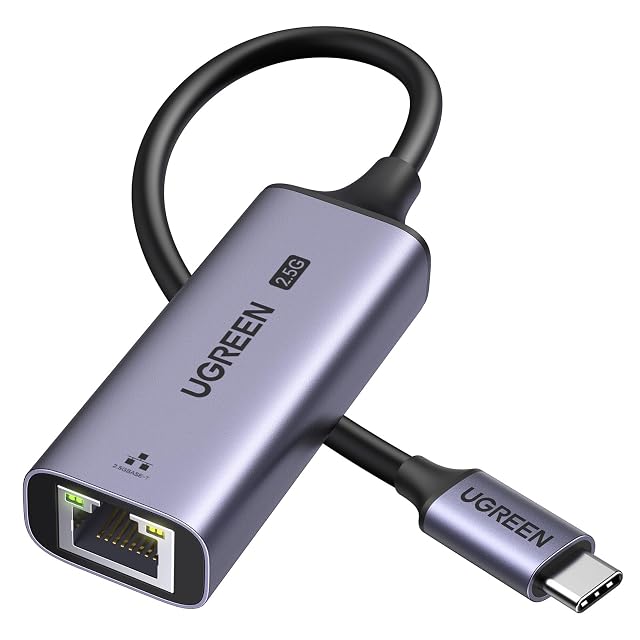
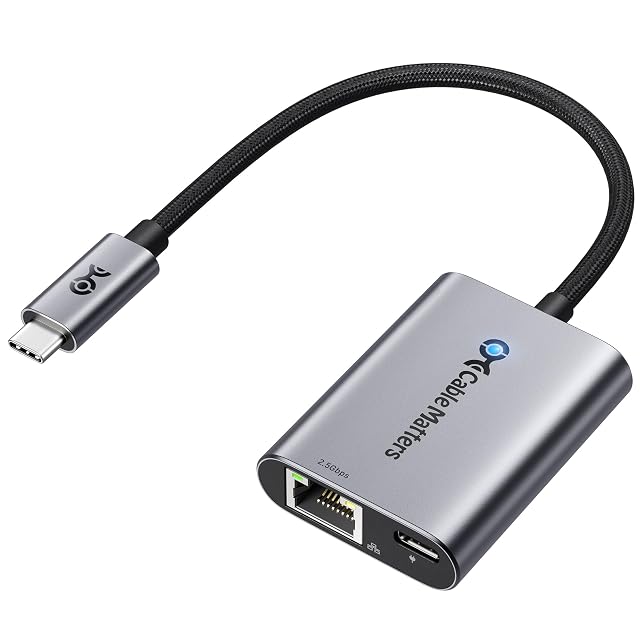
Both of these turn one USB-C socket into a 2.5-gigabit network connection, and neither publishes a USB generation for the link they run over. The UGREEN UG-USBC-25052 is an aluminium body with no lead described, and requires a driver on Windows without saying which. The Cable Matters 201453-N adds a second USB-C socket carrying up to 140 W under USB-PD 3.1, runs on a braided pigtail lead, and names the maker of the chip if not the chip.

UGREEN USB-C to 2.5G Ethernet adapter with an aluminium housing and an RJ45 socket

UGREEN UG-USBC-25052, 2.5-gigabit Type-C adapter in an aluminium shell

Wins 1 of 8

Check price

≈ $26 / £18 / 22 €

Cable Matters USB-C 2.5G Ethernet adapter with a braided lead and a USB-C power delivery socket

Cable Matters 201453-N, 2.5-gigabit Type-C adapter with a 140 W charging socket

Wins 4 of 8

Check price

≈ $35 / £30 / 30 €

Line by line

Compared on UG-USBC-25052, 2.5-gigabit Type-C adapter in an aluminium shell 201453-N, 2.5-gigabit Type-C adapter with a 140 W charging socket
USB generation Not published — the connector is named as USB-C throughout and the link behind it is never described Not published — USB-C, USB4 and Thunderbolt are named as hosts and USB-PD 3.1 for the charging socket, and no data generation is given for the adapter itself
Stated link rate Not published for the host link — the only rate on the page, up to 2500 Mbps, belongs to the Ethernet socket Not published for the host link — the only rate on the page, up to 2500 Mbit/s, belongs to the Ethernet socket
Connector type USB Type-C, named in the title and in all five bullets USB-C on a braided pigtail, with a second USB-C socket on the body carrying up to 140 W under USB-PD 3.1, stated to charge and pass 2.5 gigabits at the same time
Ethernet port speed standard Up to 2500 Mbps, backwards compatible with 1000, 100 and 10 Mbps; no BASE-T designation printed Up to 2500 Mbit/s, named for 4K and 8K streaming, gaming, calls and local transfers; no BASE-T designation printed
Controller family Not published — no chip, maker or part number, on a page that requires a driver on Windows and does not say which Not published as a part number — the current Realtek USB 2.5G Ethernet driver is recommended, particularly on older systems and certain Linux kernel versions, which names the maker without naming the chip
Stated operating system support Windows, macOS and iPadOS, under a heading of plug and play that then requires a Windows driver; a list of named devices follows Windows, macOS, Linux and ChromeOS, without versions, with routers, switches and network storage named as what it plugs into
Housing material Aluminium, named for heat dissipation and for matching a laptop’s colour Aluminium, named for durability and heat dissipation
Cable arrangement Not published — no lead, no length and nothing on whether the plug is fixed to the body A braided pigtail lead, called flexible and hard-wearing; no length printed

A tick means one listing published something the other did not, or published a better figure. It does not mean the product is better, and the column is not a score out of anything: a maker who says less loses lines here without losing a comparison. The two verdicts below are where the page is settled.

Which one, for whom

Buy the UGREEN UG-USBC-25052, 2.5-gigabit Type-C adapter in an aluminium shell

The UG-USBC-25052 is the smaller proposition: an aluminium adapter that turns a Type-C socket into 2.5 gigabits, with the fallback rates stated. It occupies the port and gives nothing back, its page never says whether the plug is on the body or on a lead, and it asks you to install a Windows driver without naming it or the chip it belongs to. On a laptop with two ports, that last point is a real gap.

Buy the Cable Matters 201453-N, 2.5-gigabit Type-C adapter with a 140 W charging socket

The 201453-N solves the problem the other one creates. Its second USB-C socket carries up to 140 W under USB-PD 3.1, so the laptop charges while the network runs — on a machine with one port, that is the difference between usable and not. The braided pigtail keeps the weight off the socket. And naming Realtek, even without a part number, tells a Linux user where to look. Neither page states its USB generation.

The questions that come up before an order

Does 2.5 gigabits fit through the USB link?

Neither page says what the link is. Both quote 2500 Mbit/s on the Ethernet side and neither publishes a USB generation or a figure in gigabits for the host side. USB 3.0 and above have the headroom on paper; what neither listing does is state which generation the adapter negotiates, so the row is recorded as not published on both.

What is pass-through charging worth here?

A port. A laptop with a single USB-C socket has to choose between power and network unless the adapter carries both, and the Cable Matters page states that its 140 W socket and the 2.5-gigabit connection work at the same time. The UGREEN adapter has no such socket, so the port it uses is a port you lose.

The full reviews

Every price named in a summary was read on the date that review carries. What a shop asks today is shown beside the product, and it moves.