Skip to content

STATIONPC PocketCloud Dock, one M.2 slot reached over Ethernet rather than USB

A dock reached over a network rather than by a cable to a computer, with three named backup modes — and no M.2 format, no link rate and no wattage anywhere on the page.

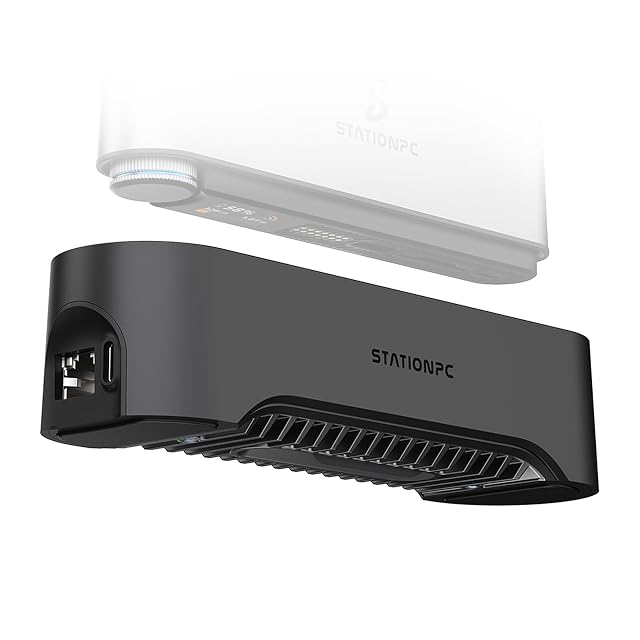
STATIONPC PocketCloud Dock with an M.2 NVMe slot and Ethernet

STATIONPC PocketCloud Dock, one M.2 slot reached over Ethernet rather than USB

A dock reached over a network rather than by a cable to a computer, with three named backup modes — and no M.2 format, no link rate and no wattage anywhere on the page.

Bay count
One — a single M.2 NVMe slot, stated in the title and in the first bullet. No 2.5-inch or 3.5-inch bay exists
Supported drive sizes
Not published on the listing — no M.2 format is named anywhere, neither 2230, 2242, 2260, 2280 nor 22110, on a device whose M.2 slot is its only position
Supported drive interfaces
M.2 NVMe — stated in the title. Whether the slot also accepts an M.2 SATA module is not stated, and no SATA bay of any kind exists
Solid-state slot support
The whole device is one M.2 slot, stated in the title as diskless. The first bullet adds that modules of different capacities can be mixed between the dock and the portable unit, which follows from there being no array to balance
Offline cloning
Yes, in three named modes — the third bullet gives Full Backup, which mirrors everything, Selective Backup for named files, and Auto Transfer, which syncs automatically. The fourth adds one-click backup through the magnetic connection
Interface standard
2.5-gigabit Ethernet, with Power Delivery charging and USB-A ports — stated in the sixth bullet. It is reached over a network rather than by a cable to a computer, and the connection to the companion device is magnetic rather than a plug
Stated link rate
Not published on the listing — the 2.5-gigabit figure belongs to the network socket and not to the M.2 slot, and the two are different measurements. No figure in gigabits per second appears for the drive itself
Connector type
Not published on the listing in full — the sixth bullet names multiple USB-A ports without a count or a USB generation, and the fourth names a magnetic connection to the maker’s portable NAS. No socket for a host computer is specified
UASP support
Not published on the listing — UASP is a USB mass-storage protocol and this device is reached over a network, so the question does not arise in the usual form. No bullet mentions it
Power supply
Power Delivery charging, with no wattage — stated in the sixth bullet as stable power. The fourth describes the dock as charging the portable unit as well as backing it up, so the figure matters twice and is given neither time
Per-bay controls
Not applicable with one bay, and replaced by a mode selection — the third bullet gives three backup modes and the fourth a one-click backup triggered by setting the portable unit on the magnetic connection
Amazon reference
B0FPCTJZ4C
EAN
0860014318214
  • Three backup modes named individually — full, selective and automatic
  • Describes a copy held on separate hardware in a separate place, and argues for it correctly rather than offering an array instead
  • No M.2 format published, on a device whose single M.2 slot is its only position and which arrives empty

Best for: Someone already using the maker’s portable NAS who wants the second copy to live at home, on the network, and to charge while it copies.

≈ $130
Check price on Amazon
Specifications

Bay count
One — a single M.2 NVMe slot, stated in the title and in the first bullet. No 2.5-inch or 3.5-inch bay exists
Supported drive sizes
Not published on the listing — no M.2 format is named anywhere, neither 2230, 2242, 2260, 2280 nor 22110, on a device whose M.2 slot is its only position
Supported drive interfaces
M.2 NVMe — stated in the title. Whether the slot also accepts an M.2 SATA module is not stated, and no SATA bay of any kind exists
Solid-state slot support
The whole device is one M.2 slot, stated in the title as diskless. The first bullet adds that modules of different capacities can be mixed between the dock and the portable unit, which follows from there being no array to balance
Offline cloning
Yes, in three named modes — the third bullet gives Full Backup, which mirrors everything, Selective Backup for named files, and Auto Transfer, which syncs automatically. The fourth adds one-click backup through the magnetic connection
Interface standard
2.5-gigabit Ethernet, with Power Delivery charging and USB-A ports — stated in the sixth bullet. It is reached over a network rather than by a cable to a computer, and the connection to the companion device is magnetic rather than a plug
Stated link rate
Not published on the listing — the 2.5-gigabit figure belongs to the network socket and not to the M.2 slot, and the two are different measurements. No figure in gigabits per second appears for the drive itself
Connector type
Not published on the listing in full — the sixth bullet names multiple USB-A ports without a count or a USB generation, and the fourth names a magnetic connection to the maker’s portable NAS. No socket for a host computer is specified
UASP support
Not published on the listing — UASP is a USB mass-storage protocol and this device is reached over a network, so the question does not arise in the usual form. No bullet mentions it
Power supply
Power Delivery charging, with no wattage — stated in the sixth bullet as stable power. The fourth describes the dock as charging the portable unit as well as backing it up, so the figure matters twice and is given neither time
Per-bay controls
Not applicable with one bay, and replaced by a mode selection — the third bullet gives three backup modes and the fourth a one-click backup triggered by setting the portable unit on the magnetic connection
Amazon reference
B0FPCTJZ4C
EAN
0860014318214
On Amazon.com
Amazon.com had an offer at $130 on October 26, 2026.

Most drive docks end in a cable that goes to a computer. This one ends in a network socket.

The sixth bullet gives 2.5-gigabit Ethernet, Power Delivery charging and multiple USB-A ports. The fourth gives a magnetic plug-and-play connection to the maker’s own portable NAS, for one-click backup and fast charging, and says it supports several of those devices for batch backup. So the object is a base station: something a portable device is set onto, which copies it and charges it, and which is reached from the network rather than from a desk.

That makes it the odd one out here in a way worth being plain about. It is still a dock by the definition this shelf uses — the first bullet gives an M.2 slot that a module is dropped into — but it is not a way of reading a bare drive from a laptop. If that is what is wanted, a USB dock does it and this one does not claim to.

The backup modes are the best-published part. The third bullet names three: Full Backup, which mirrors everything; Selective Backup, for named files; and Auto Transfer, which syncs on its own. Three modes named individually. The second bullet explains the arrangement behind them — one drive travels in the portable unit, the second stays in the dock at home or in a studio — and argues that keeping the second copy indoors reduces the chance of losing both. That is a copy held on separate hardware in a separate place, which is a different thing from an array surviving a dead drive, and the page is describing it correctly.

The first bullet makes a claim about mixing capacities: unlike a conventional array, modules of different sizes can be used together. On a single-slot dock paired with a single-slot portable unit that is simply true, because there is no array to balance.

Now the gaps. No M.2 format is named anywhere — not 2230, not 2242, not 2280 — on a device whose M.2 slot is its only position, and the module has to be bought separately since the title says the dock arrives diskless. No link rate is published for the drive at all: 2.5 gigabits is the speed of the network socket, not the speed at which the slot reads the module, and the two are different measurements. No wattage is given for the Power Delivery charging, on a product that advertises charging as one of its two jobs. And the USB-A ports are described as multiple without a count or a generation.

Cooling is named without being measured: the fifth bullet gives an integrated metal heatsink and intelligent cooling, with thermal throttling as the thing avoided. It answers heat with metal rather than with a fan.

The title contains a misspelling — “Expend Storage” where it means expand — and the product record carries the listing’s own ASIN in place of a manufacturer reference. At $129.99 on Amazon.com on October 26, 2026 and 422 g (14.9 oz), with the dock sold empty, the real cost is this plus a module plus the portable unit it is built to serve.

Prices quoted in this text were read on October 26, 2026. The live price is at the top of the page.

The questions that come up before an order

Can I plug it into a laptop to read a drive?

The page does not say so. It gives 2.5-gigabit Ethernet, Power Delivery charging and USB-A ports, and a magnetic connection to the maker’s own portable NAS. No socket for a host computer is specified; a USB drive dock is the device built for that job.

Which M.2 modules will fit?

The listing does not say. It names M.2 NVMe and no format length anywhere — not 2230, not 2242, not 2280. The dock arrives diskless, so the module has to be chosen without that figure.

How fast does it read the drive?

The page publishes no link rate for the slot. The 2.5-gigabit figure in the sixth bullet is the speed of the network socket, which is what reaches the dock rather than what the dock reaches the module at.

What are the three backup modes?

Full Backup mirrors all the data, Selective Backup copies named files, and Auto Transfer syncs on its own. All three are named in the third bullet.

All drive docks